

Most single-shop owners don't have a technology problem. They have a sequencing problem. They buy a shiny POS because a rep pitched it well, then discover it doesn't talk to their delivery app, which doesn't talk to their payment processor, which forces someone to re-key orders three times a day. Six months and a few thousand dollars later, the shop runs slower than it did on paper tickets.
A real dry cleaner technology strategy isn't about which tools are "best." It's about the order you introduce them, tied to where you actually bleed money and time. Get the sequence right and each new piece pays for the next. Get it wrong and you end up with five subscriptions that half-work and a staff that quietly reverts to the old way.
This is a roadmap for wiring your shop up in the right order — orders first, then inventory, then payments, then delivery — with the guardrails to know when a step is worth it and when to walk away.
Why shops integrate in the wrong order
The instinct is to start where the pain feels loudest. Usually that's delivery, because a missed drop generates an angry phone call and everyone remembers angry phone calls. So the owner buys routing software first.
But delivery sits at the end of the operational chain. If your order data is messy at intake, your routing software just organizes garbage more efficiently. You're optimizing the last mile while the first mile is still on sticky notes.
Order created → garment tracked → payment settled → garment delivered.
Data flows downstream. A mistake at the order stage multiplies at every stage after it. That's why integration has to follow the same direction the work does. Stabilize the source before you automate the outcomes.
The other reason shops get the order wrong: ROI on the front end is harder to feel but easier to measure. Fixing intake doesn't produce a dramatic moment. It produces a slow disappearance of small errors — the wrong ticket, the lost garment, the "I already paid" argument — that were quietly costing 20-30 minutes a day and a handful of comped orders a month.
The minimal data model (start here before buying anything)
Before you evaluate a single vendor, define what data your shop actually needs to move between systems. This is the part everyone skips, and it's why integrations break later.
Never lose track of an order again.
Pressesly helps you manage, track, and communicate every garment order seamlessly.
- Unified order management
- Real-time customer notifications
- Staff scheduling & workload tracking
No credit card required
| Object | Fields that matter | Why it has to be stable |
|---|---|---|
| Customer | ID, name, phone, address, preferences (starch, hangers) | Everything else attaches to this. If phone numbers are formatted three ways, no system can match them. |
| Order | Order ID, customer ID, intake date, promised date, status, total | The spine of the whole operation. Every other system reads from this. |
| Garment | Garment ID, order ID, type, service, defect notes, photo ref | Tracking lives here. Ties to barcode/QR tags. |
| Payment | Payment ID, order ID, amount, method, status, date | Must reconcile back to the order, not float on its own. |
| Delivery | Route ID, order IDs, window, driver, proof-of-drop | Reads from orders; should never create order data. |
The key rule: one source of truth per object. The customer record lives in one place. The order lives in one place. When you add a new tool, it should reference these IDs, not create its own version of them. The moment two systems both think they own the customer list, you've built a reconciliation nightmare.
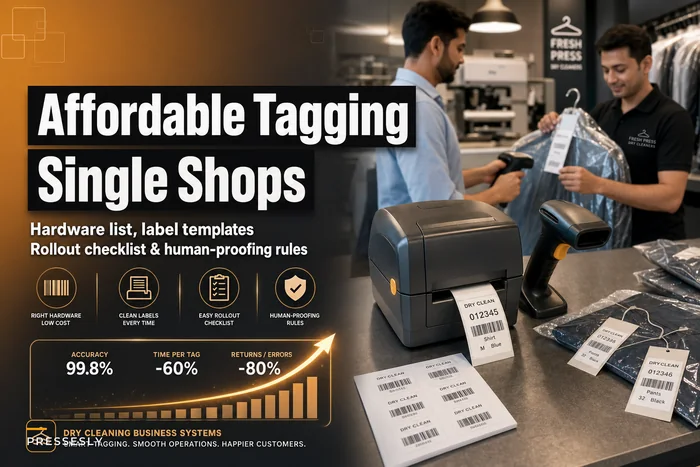
Roll out barcode tags over a single weekend and tie those tag IDs back to the garment object in your order system to make downstream integrations simpler.
If you're already tagging garments, your barcode setup is the physical anchor for the garment object — this is where a solid barcode tagging rollout pays off, because the tag becomes the ID that follows the garment through every downstream system.
Phase 1: Orders — get the source clean first
Everything starts at intake. If order data is inconsistent, no amount of downstream software saves you.
What you're fixing: handwritten tickets, inconsistent garment descriptions, promised dates set by gut feel, and the customer record that exists in someone's memory.
What "done" looks like: every order has a unique ID, a promised date generated by a rule (not a guess), a linked customer, and a status that anyone in the shop can read at a glance.
The unglamorous win here is status codes. When "in progress" means five different things depending on who you ask, handoffs break. A tight set of statuses — intake, cleaning, pressing, QC, ready, out-for-delivery, delivered — gives everyone a shared language. That single change reduces the "where's my order" scramble more than any other tech move.
A typical example: a shop doing around 300-350 orders a week was losing maybe 4-6 garments a month to bad intake — orders logged wrong, tickets that didn't match the bag. At an average ticket of $18, plus goodwill credits and re-cleaning costs, that's a couple hundred dollars a month gone before any garment even hit the machine. Cleaning up intake didn't require fancy software. It required a consistent order structure that downstream tools could later plug into.
ROI trigger to move to Phase 2: don't touch inventory software until intake errors are consistently under roughly 1% of orders and status codes are actually being used by every shift. If the foundation still wobbles, integrating more on top just spreads the wobble.
Phase 2: Inventory — connect what you clean to what it costs
Once orders are clean, the next leak is usually supplies and garment tracking. This is where the garment object and consumables meet.
-
Garment tracking ties each physical item to its order via tag. Fewer lost garments, faster location during the "it's ready but we can't find it" moment.
-
Consumables tracking — hangers, poly, solvent, detergent — gets tied to volume so you stop over-ordering and stop running out mid-shift.
The insight most owners miss: inventory integration only works if Phase 1 is solid, because consumable usage is calculated from order volume. If your order data is unreliable, your par levels are guesses dressed up as numbers.
A par-level system reading real order counts will tell you when you're burning through poly faster than order growth justifies — which usually means waste at the packaging station, not higher demand. That's the kind of pattern you can only see when orders and inventory share the same spine.
When this is a bad idea: if you're a very low-volume shop with a stable supplier relationship and you never run out of anything, formal inventory software may not clear the ROI bar yet. Don't automate a problem you don't have.
ROI trigger to move to Phase 3: move to payments once garment loss is near zero and you can predict weekly consumable needs without doing a physical count.
Phase 3: Payments — close the loop between order and money
Payment integration is where the ROI gets easy to see, because it's directly about cash you're currently losing.
-
Orders marked delivered but never fully paid
-
"I already paid" disputes with no record
-
Manual reconciliation at end of day that eats 30-45 minutes
-
Failed cards on delivery and subscription plans that quietly lapse
The whole point is that payment status attaches to the order, not to a separate processor dashboard you check once a day. When a garment can't leave the shop unless its order shows paid-or-authorized, an entire category of revenue leakage disappears.
Reconciliation is the quiet money-maker here. A shop settling payments by hand against a paper log will always have small gaps — a comped order that wasn't logged, a partial payment nobody flagged. Tie payments to orders and the register basically balances itself. The daily close drops from a chore to a glance.
This phase also connects directly to customer retention. When payment and order history live together, you can actually see who's slipping — the every-two-weeks regular who hasn't been in for six weeks. That's the bridge to a real customer-lifecycle system, where offers and reminders fire off actual behavior instead of hunches.
Who should NOT rush this: if you're primarily cash or running a single card terminal with clean daily totals, the payment integration ROI is lower. Prioritize it if you run accounts, subscriptions, or delivery billing, where the leakage compounds.
Phase 4: Delivery — automate the outcome, not the input
Delivery comes last on purpose. By now, orders are clean, garments are tracked, and payments are settled. Routing software finally has good data to work with.
When routing reads your order list, every order already has a valid address, a confirmed payment status, and a known garment location. The route builds itself off reliable inputs instead of forcing a driver to sort out mismatches on the road.
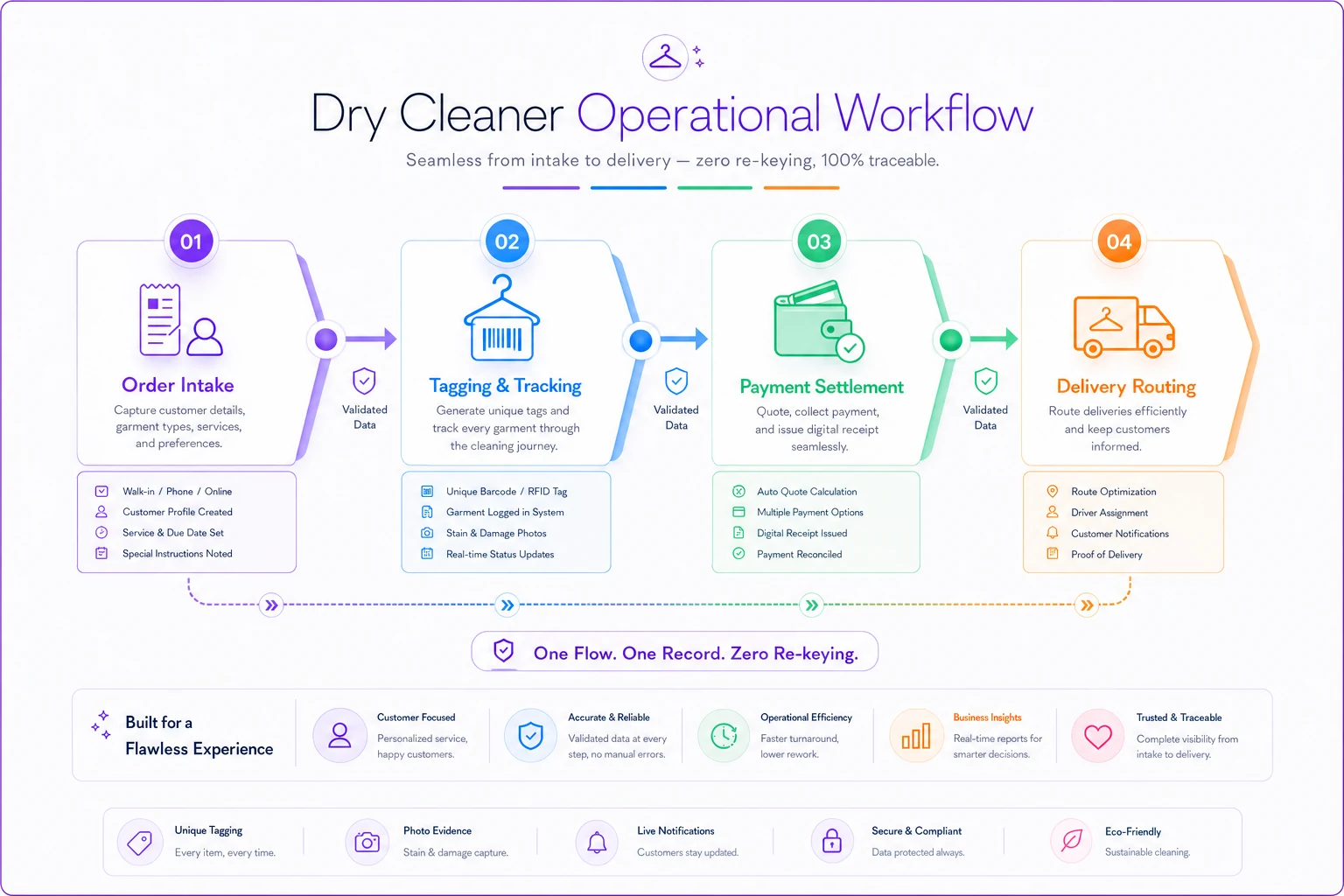
This diagram highlights how delivery should read validated upstream data rather than requiring manual fixes in the field.
This is also where the earlier work compounds. Proof-of-drop attaches back to the order. A failed delivery updates status automatically. The customer notification fires from the same order record everyone else reads. Nothing gets re-keyed.
If you'd integrated delivery first, none of this would hold together — you'd be routing addresses pulled from an unreliable order list and manually confirming payment before every drop. Last in the sequence, it's the payoff for everything upstream.
The vendor-selection checklist
The order of adoption matters more than the brand names, but you still have to pick tools that can actually connect. Run every prospective vendor through this before signing:
-
Does it expose your data? If you can't export your customers, orders, and payments in a standard format, you don't own your data — the vendor does. Walk away.
-
Does it use stable IDs? Ask specifically how it references customers and orders. If it can't sync on a shared ID, the integration will be duct tape.
-
Does it respect a single source of truth? Or does it insist on owning everything? A tool that demands to own your customer list will fight every other tool.
-
Month-to-month or locked-in? For a single shop, avoid long contracts until the tool has proven itself in your actual workflow for at least a quarter.
-
What's the real cost at your volume? Per-order pricing looks cheap at demo scale and bites at 1,200 orders a month. Model it at your real numbers.
-
Can your slowest staff member use it? If intake takes longer than paper, the shop will quietly abandon it. Test with your least tech-comfortable employee, not your sharpest.
-
What happens when it breaks? Support response time is an operational input, not a nice-to-have. A POS down during Saturday rush costs real money.
The most common expensive mistake: choosing the tool with the most features instead of the one that connects cleanly. A slightly less capable system that shares data beats a powerful island every time.
Cutover guards: how not to blow up a working shop
Every phase involves a switch from old process to new, and this is where shops get hurt. The failure pattern is always the same — flip the switch on a busy day, something breaks, staff panics, everyone reverts, and the tool gets blamed for a rollout problem.
-
Run parallel for one to two weeks. Keep the old method (even paper) running alongside the new one. Yes, it's double work briefly. It's cheaper than losing a day of orders.
-
Pick a slow window to go live. Never cut over the week before a holiday or during your seasonal peak. Tuesday morning in a slow stretch, not Friday afternoon.
-
Migrate a subset first. Move one order type or one customer segment onto the new system before the whole shop.
-
Define your rollback trigger in advance. Decide before you start what failure looks like — e.g., "if intake errors exceed 5% after three days, we pause and fix." Without a defined trigger, people either abandon too early or push through a broken rollout too long.
-
Keep a manual fallback documented. If the system goes down mid-shift, everyone should know exactly how to take orders on paper and reconcile later.
The owners who skip the parallel run are the ones who end up back on sticky notes swearing off technology entirely.
ROI thresholds: knowing when a phase is worth it
Each phase should clear a bar before you spend on the next. Rough thresholds that hold up for most single shops:
| Phase | Green light to proceed if... | Red flag — don't proceed |
|---|---|---|
| Orders | Intake errors under ~1%, status codes used every shift | Staff still keeping a parallel paper system by choice |
| Inventory | Garment loss near zero, consumable use predictable | You never run out and never over-order anyway |
| Payments | Daily reconciliation gaps closing, disputes dropping | Clean cash-only close with no accounts or subscriptions |
| Delivery | Reliable addresses + payment status on every order | Delivery is a small side line, not a real revenue channel |
The discipline here is the whole point: don't advance a phase just because the software exists. Advance because the previous phase is stable and the next problem is now your biggest one. A single shop that adds one integrated layer per quarter — cleanly — ends the year with a system that largely runs itself. A shop that buys all four at once usually ends the year unwinding two of them.
If you're not sure which leak is actually biggest, that's a measurement problem first. Getting clear on which KPIs actually predict profit tells you where the money is really going before you spend a dollar on tooling.
A real scenario
A single-location shop running roughly 320-360 orders a week had bought a delivery app and a separate POS in the same month, plus a standalone card reader. Three systems, none connected. Staff re-entered every delivery order by hand into the routing app, reconciled payments against a paper log at night, and lost track of maybe 5-7 garments a month.
Instead of buying more, they went backward and rebuilt in sequence. First, they standardized intake and status codes on the POS they already owned — no new spend, just discipline. Intake errors dropped noticeably within a few weeks. Then they tied garment tags to orders, and the "we can't find it" scramble mostly stopped. Only then did they connect payments to the order records, and the nightly reconciliation went from a 40-minute headache to a quick check.
Delivery came last. Once the routing app could pull clean, paid, tracked orders automatically, the double data entry disappeared — that alone gave back the better part of an hour a day.
Net effect over a few months: no dramatic revenue spike, but the small leaks closed. Lost garments dropped to near zero, comps fell, reconciliation gaps shrank, and staff stopped fighting the tools. The shop wasn't running more software than before — roughly the same amount, finally in the right order and actually connected.
Where this leaves you
Technology at a single shop isn't a shopping decision, it's a sequencing decision. The tools matter less than whether they share a clean spine of order, garment, payment, and delivery data — and whether you introduce them in the order the work actually flows.
Start at the source. Fix intake before you automate outcomes. Make each phase clear an ROI bar before funding the next. Guard every cutover with a parallel run and a defined rollback. Do that, and each layer you add makes the next one cheaper and easier instead of creating another island to reconcile.
The shops that win with technology aren't the ones with the most tools. They're the ones who resisted buying the fourth thing until the first three were quietly, reliably working.
Ready to elevate your dry cleaning operations?
Join hundreds of dry cleaners using Pressesly to save time, reduce errors, and enhance customer satisfaction.