

Your counter person just spent twelve minutes hunting for Mrs. Chen's wool coat. The presser has three unclaimed items from last week sitting on the rack with no tags. And that silk blouse that went missing two months ago? Still getting angry phone calls about it.
Most dry cleaners know barcode tagging would fix this mess, but the quotes from enterprise systems are insane — $15,000 setups, monthly licensing fees, proprietary hardware that breaks and costs $800 to replace. The whole thing feels built for chains with 20 locations, not a single shop trying to track 400 garments a day without losing their mind.
After watching dozens of shops implement dry cleaner barcode tagging on realistic budgets, the pattern is pretty clear: you need around $1,800 in hardware, the right label stock, and a rollout process that doesn't crash your daily operations. Shops that get this right typically see their lost garment rate drop from 3-4 items a month down to maybe one every quarter. More importantly, counter staff stop burning 30-40 minutes daily playing detective with misplaced orders.
The Hardware Stack That Actually Works
Forget sales pitches about "enterprise-grade scanning solutions." A single-location dry cleaner needs four pieces of equipment that won't break your budget or your workflow.
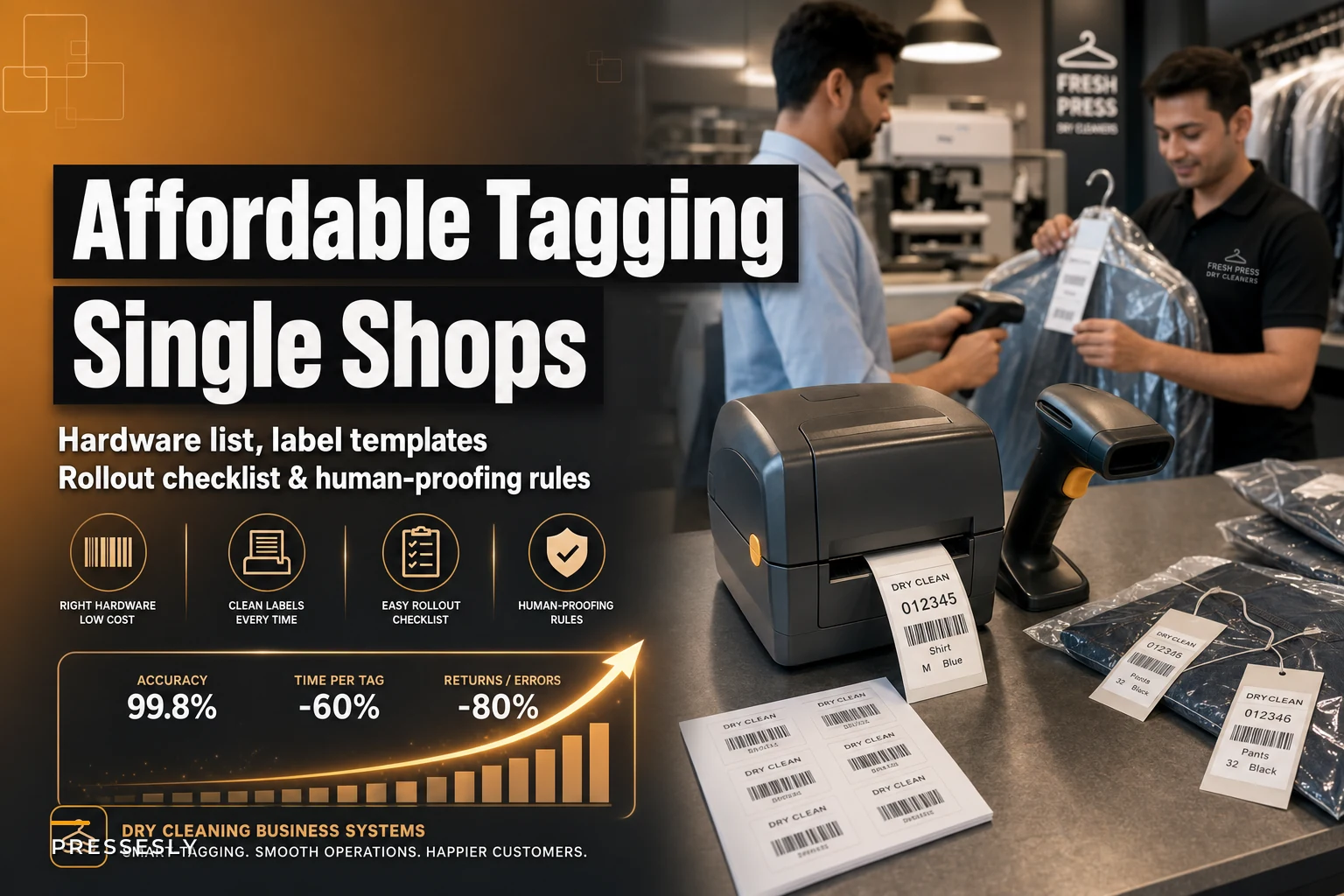
The barcode printer is where most shops either overspend or underspend badly. The Zebra ZD420 runs about $450 and prints heat-transfer labels that survive your cleaning process. Some shops try to save $200 with a direct thermal printer, then watch their barcodes fade after two cycles through the machines. Others drop $1,200 on an industrial printer that's complete overkill for 400 labels a day.
Scanner selection depends entirely on your counter setup. A fixed point-of-sale station? A corded Honeywell 1450g at $120 handles everything fine. But most shops benefit from at least one wireless scanner — the Zebra DS2278 at around $280 lets your team scan items at the rack instead of hauling everything to the counter. One shop owner described the difference pretty well: "We went from a conga line at the counter during morning rush to scanning everything right where it hangs."
The label applicator sounds unnecessary until you're peeling and sticking 400 labels daily. A basic handheld applicator runs $35 and cuts labeling time by roughly 40%. Your team's wrists will thank you after the first week.
| Equipment | Primary Choice | Budget Alternative | Don't Bother With |
|---|---|---|---|
| Printer | Zebra ZD420 ($450) | Brother QL-820NWB ($200) | Any direct thermal under $150 |
| Scanner | Zebra DS2278 wireless ($280) | Honeywell 1450g corded ($120) | Smartphone "scanner" apps |
| Labels | Synthetic heat-transfer | Polypropylene direct thermal | Paper labels of any kind |
| Software | Cloud POS with barcode module | Standalone tracking system | Excel spreadsheets |
Backup equipment matters more than most shops realize. Keep a spare printhead ($90), an extra scanner battery ($45), and a backup corded scanner. When your main scanner dies at 4 PM on Friday, you'll understand why.
Label Templates and Placement Rules
The physical label design determines whether your system runs smoothly or becomes a nightmare of scanning errors and reprints.
Never lose track of an order again.
Pressesly helps you manage, track, and communicate every garment order seamlessly.
- Unified order management
- Real-time customer notifications
- Staff scheduling & workload tracking
No credit card required
Your label needs exactly four elements: the barcode itself, order number in human-readable text, customer last name, and promise date. Anything else clutters the scan zone and slows your team down. One shop tried adding customer phone numbers and special instructions to their labels — scanning accuracy dropped noticeably because the extra text got in the way of quick visual verification.
Size matters more than people expect. A 2" x 1" label fits perfectly on safety pins without obscuring garment details. Smaller labels save pennies but frustrate your team when scanners struggle to read them. Larger labels waste material and look unprofessional pinned to delicate fabrics.
Stick to Code 128 or Code 39 for your barcode format — both scan reliably even when slightly damaged. Avoid QR codes for primary tracking. They're trendy but scan poorly when crumpled or partially obscured. One shop switched to QR codes and watched their scan success rate drop during busy periods. They switched back within two months.
-
Shirts and blouses
left shoulder seam
-
Pants and skirts
left waistband
-
Coats and dresses
left inner lining near the top
Train every team member on these exact spots. When placement varies, staff waste time hunting for labels, especially on dark garments where white labels blend into patterns.
Keep a printed sample label taped near the printer for quick visual checks and sizing reference.
Heat-transfer synthetic labels cost about $0.03 each versus $0.01 for paper. The difference feels significant until you factor in reprints. Paper labels fall off, smudge, or become unreadable after cleaning. If you're reprinting even 10% of your labels, you're already losing money compared to quality synthetic stock.
The Week-by-Week Rollout Process
Trying to barcode your entire operation in one weekend is how shops end up with chaos Monday morning. The ones that successfully implement dry cleaner barcode tagging follow a phased approach that keeps normal operations running while building the new system alongside it.
A simple visual of this phased rollout helps teams follow the steps.
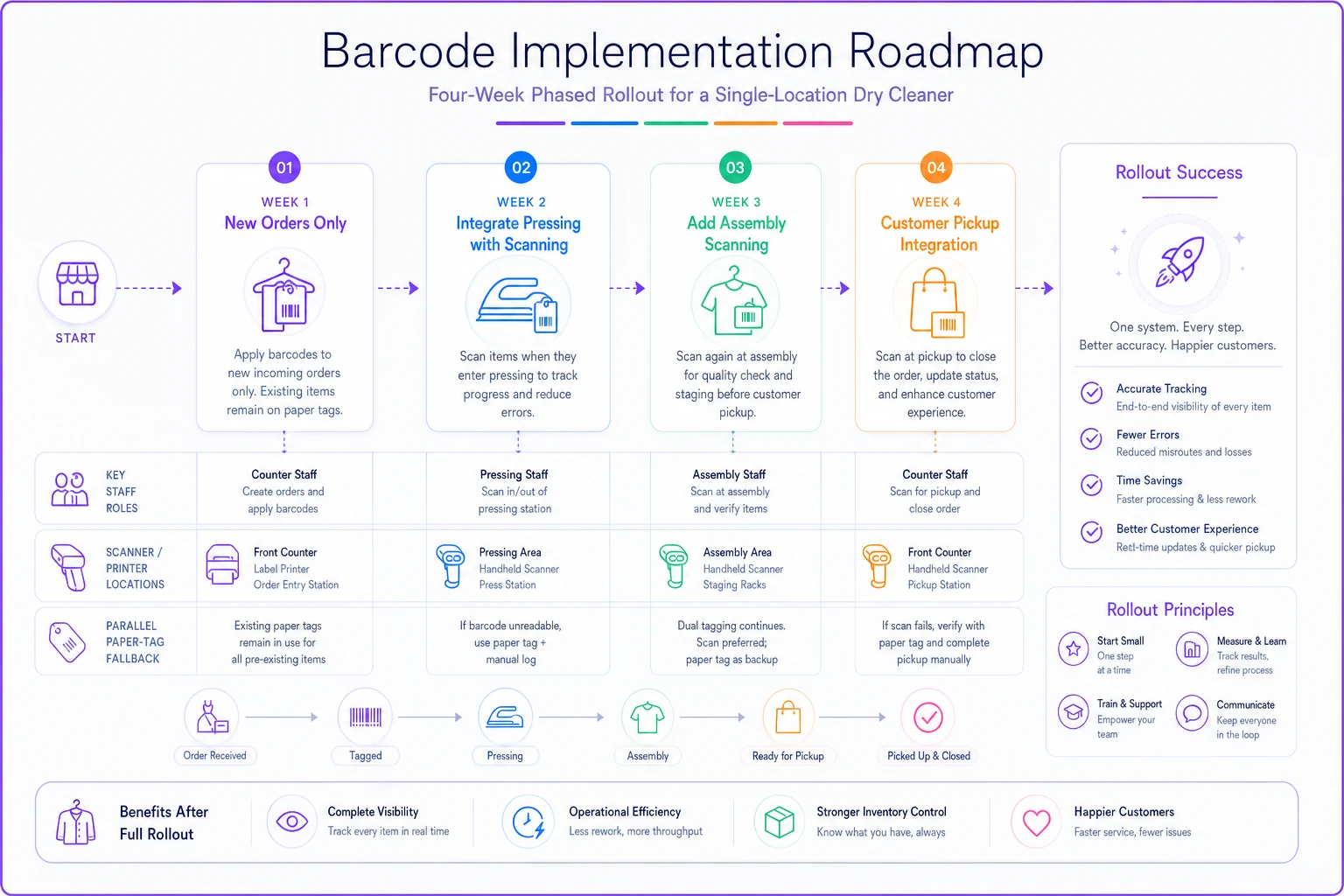
Week 1: New orders only
Start by tagging only new items coming in. This gives counter staff time to learn the scanning process without pressure. Expect about 25% slower intake for the first three days while people adjust. Keep your old paper tag system running in parallel — you're not replacing anything yet, just adding barcodes to new orders.
This week, workflow problems surface fast. Maybe your scanner placement forces awkward reaching. Maybe the printer location creates bottlenecks. Fix these now while volume is manageable.
Week 2: Integrate with pressing
Your pressing team starts scanning items before and after service. This creates your first real tracking data — you can actually see how long items sit between stations. More importantly, pressers learn to flag missing barcodes immediately instead of guessing which order something belongs to.
Week 3: Add assembly scanning
Assembly is where barcode systems really prove their value. Instead of matching paper tickets, your team scans items into complete orders. Assembly time typically drops 30-40% once people get comfortable. One shop measured their average assembly time dropping from around 90 seconds per order to roughly 55 seconds.
Week 4: Customer pickup integration
Now you activate the customer-facing side. Scan at pickup to automatically mark orders complete. Print receipts showing exact items returned. Most owners realize at this point just how much time they were burning on manual checkout.
Keep the parallel system running for at least two more weeks after that. Yes, it's extra work maintaining both, but it's your insurance against catastrophic failure. After six weeks, once everyone's comfortable and the kinks are worked out, you can retire the paper tags.
Error Prevention and Recovery Rules
Barcodes fail. Scanners break. Employees make mistakes. The difference between smooth operations and a real mess is having clear protocols for when things go wrong.
The double-scan problem happens constantly in busy shops. Someone scans an item twice by accident and creates duplicate records. Your system needs automatic duplicate detection, but more importantly, your team needs a visual confirmation habit. Make scanners beep differently for successful scans versus errors. Train staff to watch the screen, not just listen for beeps.
Common error triggers and fixes:
Missing label on return: Keep a "recovery station" with pre-printed generic labels numbered 9000-9999. When an item arrives without a label, apply a recovery label and manually link it in your system. Takes 30 seconds versus 10 minutes of detective work.
Damaged barcode: Train staff to type the human-readable order number instead of attempting to scan a damaged label twenty times. Sounds obvious, but shops often don't explicitly train this, which leads to frustrated employees and customers waiting in line.
Wrong item scanned to order: Build a same-day correction window into your process. Mistakes caught within 24 hours are easy to fix. Mistakes discovered at pickup become customer service problems. Run a daily exception report showing unusual patterns — like one order with fifteen items when the customer typically brings in three.
Scanner connection drops: Wireless scanners lose connection. It happens. The critical rule: transactions in progress during connection loss must be re-scanned entirely. Never assume partial data uploaded correctly. One shop lost a $400 wedding dress order because they assumed a partial scan completed when the connection restored.
Set maximum scan attempt limits. After three failed attempts, staff must use manual entry. This prevents the common scenario where someone spends two minutes trying to scan a damaged label while five customers wait.
Track your error rate weekly. Most shops start at 5-8%, dropping to under 2% after a month. If the rate stays high, you've got a training or equipment problem, not a "learning curve." One shop's error rate sat at 7% for two months — turned out the scanner needed cleaning and was misreading every tenth barcode.
Budget Breakdown for Different Shop Sizes
Real numbers from real implementations, not vendor projections about "your investment potential."
Shops processing 200-300 items daily can run a complete barcode system for around $1,400 initial investment:
-
Zebra ZD420 printer
$450
-
Two corded scanners
$240
-
Label stock (6 months)
$180
-
Basic cloud POS with barcode module
$89/month
-
Installation and setup
$350
-
Contingency/backup equipment
$200
These shops typically save 3-4 hours daily on sorting, assembly, and customer lookup. At $15/hour labor cost, that's roughly $1,100 monthly in efficiency gains. The system pays for itself in under two months.
Shops processing 400-500 items daily need more robust equipment, pushing initial investment to around $2,200:
-
Zebra ZD420 printer
$450
-
One wireless, two corded scanners
$520
-
Industrial label applicator
$95
-
Label stock (6 months)
$280
-
Cloud POS with advanced tracking
$149/month
-
Installation, setup, and training
$550
-
Backup equipment
$300
The efficiency gains scale up too. Shops at this volume often eliminate what amounts to a part-time position worth of labor, saving somewhere between $1,800-2,200 monthly.
Budget constraints that actually matter:
Don't cheap out on the printer. A failing printer during morning rush shuts down your entire intake process. The price difference between reliable and garbage is about $200 — trivial compared to the chaos of printer failure on a busy Monday.
Skip the fancy features initially. RFID tags, customer mobile apps, automated conveyors — all of that can wait. Get basic barcode tracking working smoothly first. One shop spent $4,000 on RFID upgrades before establishing basic processes and ended up reverting to simple barcodes after six months of problems.
Watch the monthly software pricing carefully. That $89/month system becomes $149 once you need basic features, then $249 for multi-user access. Ask what you'll actually be paying in year two, not just the introductory rate.
Integration with Existing Systems
Unless you're opening a brand new shop, you've got existing systems that need to work alongside barcode tracking. The integration usually isn't as painful as vendors suggest, but there are specific gotchas worth knowing.
Your point-of-sale system is the biggest factor. Modern cloud systems like Square or Clover typically have barcode modules you can activate. Legacy systems from the early 2000s might need replacement. The tell-tale sign: if your POS requires a specific version of Windows to run, it probably won't integrate with modern barcode equipment without expensive middleware.
Customer database migration is where shops stumble. Your existing customer records need unique IDs that link to barcodes. Most shops have duplicate records, inconsistent data entry, and missing information scattered everywhere. Budget a full weekend for data cleanup before launching. One owner found seventeen different entries for the same customer, each with a slightly different spelling of her name.
The pressing machines themselves don't need any integration — that's vendor nonsense to sell you "compatible" equipment. Your barcodes track garments through the process; the machines just clean them. Same with your conveyor if you have one.
Phone systems and customer communication tools benefit from integration but don't require it. When someone calls about their order, you scan or type the barcode number and pull up status instantly — much better than "let me check in the back." Some shops link their barcode system to automated text messages, but that's an enhancement, not a requirement.
Accounting software can wait until month two or three. Focus on operational workflow first, financial reporting second. Shops that try to perfect their QuickBooks integration before mastering basic scanning usually end up struggling with both.
The integration that matters most is your team's daily habits. The technical connections mean nothing if your presser forgets to scan or your counter person bypasses the system during a rush. Workflow adoption beats software integration every time.
Common Failure Points and Solutions
Most barcode implementations that fail follow predictable patterns. Recognizing them early saves weeks of frustration.
The partial adoption trap kills more systems than any technical problem. When some employees use barcodes while others stick to paper tags, you get the worst of both worlds — double work, inconsistent data, and constant confusion. One shop operated this way for four months before admitting defeat. The fix is straightforward: mandatory usage after the training period, no exceptions.
Label quality degradation usually shows up around month three. Labels start scanning poorly, requiring multiple attempts. The usual culprit is switching to cheaper label stock once the initial supply runs out. That $40 savings on a case of labels costs you hours of frustrated scanning attempts. Stick with the exact label specifications that worked during setup.
Scanner maintenance neglect creates gradually worsening performance that people blame on aging equipment. Scanners need weekly cleaning with isopropyl alcohol and lint-free cloths — the lens accumulates fabric particles that kill scan accuracy. One shop replaced three "broken" scanners before someone noticed the lens was just dirty.
Scope creep is a real problem once barcode tracking works well. Suddenly you're tagging hangers, printing customer loyalty barcodes, tracking employee time with scanners. Each addition seems logical but collectively they overwhelm a simple system. One shop went from smoothly tracking garments to total chaos after trying to barcode supplies, equipment, and delivery vehicles. Keep the focus on the core job: tracking customer garments.
Training shortcuts during busy seasons guarantee future problems. New employees get five minutes of "here's how to scan" instead of proper training on error handling, placement standards, and recovery procedures. Then those undertrained employees end up teaching other new hires their bad habits. Document your training process and stick to it regardless of how busy things get.
Metrics obsession sneaks up on owners once they see how much data barcodes generate. Suddenly there are fifteen daily reports, scan time analysis, employee efficiency comparisons. Meanwhile actual operations suffer because everyone's focused on hitting numbers instead of serving customers. Track three or four things: items processed, error rate, and average turnaround time tell you everything that matters.
Making Barcodes Work with Your Workflow
The technology is maybe 20% of successful dry cleaner barcode tagging. The other 80% is adapting your shop's workflow to actually take advantage of what tracking gives you.
Start with your existing bottlenecks. Most shops have two or three places where work piles up — maybe it's assembly on Thursday afternoons, maybe it's sorting on Monday mornings. Your barcode system should attack these specific problems first rather than trying to transform everything at once.
For assembly bottlenecks, set up a dedicated scanning station where workers can process multiple orders without moving. Mount the scanner on an adjustable arm, keep labels at consistent heights, and clear the surrounding area. One shop cut assembly time by 35% just by eliminating the need to walk between the rack and counter for each scan.
Morning sorting chaos needs a different approach. Try a two-person rapid-scan process where one person scans while another sorts into designated zones. The scanner calls out customer names or order numbers, the sorter places items in the right spot. Once they find their rhythm, they can move through about 100 items in fifteen minutes.
Your shop almost certainly has unofficial processes that everyone just knows. Maybe alterations always get handled separately. Maybe Saturday pickups get priority. Build these into your barcode workflow explicitly — different label colors or order number prefixes work well for special handling. When the system matches how you actually work, adoption happens naturally.
Pay special attention to the counter handoff when customers drop off items. This is where errors cascade through the entire system. Build in a quick verification step where customers confirm item count before leaving. Display scanned items on a customer-facing screen. That immediate verification prevents the "I dropped off seven shirts, not six" arguments that eat up everyone's time.
Managing turnaround times gets considerably easier once barcodes track each step — you can see exactly where items bog down and adjust. But don't let the data override your intuition about what works in your specific shop.
Long-Term Maintenance Costs
After the implementation excitement fades, ongoing costs become the reality. Budget for these or watch your system slowly degrade.
Label stock runs about $45-60 monthly for shops processing 300-400 items daily. Buying in bulk saves money, but store labels properly — heat and humidity destroy adhesive quality. One shop bought a year's supply, stored them in a damp basement, and watched labels fall off garments after two months.
Scanner repairs and replacements hit eventually. Budget roughly one replacement yearly at $150-300, plus minor repairs. Wireless scanner batteries last 18-24 months. The printer needs a new printhead every 12-16 months at about $90. None of this should be a surprise if you plan for it.
Software fees creep up through feature additions and extra user licenses. That $89/month system quietly becomes $189 once you add inventory tracking, customer portal access, and multi-location support you don't use. Review your subscription quarterly and cut unused features.
Training costs recur as employees come and go. Budget four hours of paid training per new employee, plus the efficiency dip during their first week. Shops that skimp here lose more through errors and rework than they ever saved on training time.
The hidden cost that catches people off guard: PCI compliance if your barcode system touches payment processing. Requirements can add $50-100 monthly in monitoring and certification fees. Some shops avoid this entirely by keeping payment processing completely separate from their tracking system.
Plan for system upgrades every 3-4 years. What works reliably today becomes obsolete as operating systems update and manufacturers end support. Setting aside $400-600 annually for progressive upgrades beats facing a massive overhaul when everything goes end-of-life simultaneously.
When to Consider Operational Software
Most shops manage fine with basic barcode scanning and standard POS features for the first year or so. But around 400-500 items daily, or when managing delivery routes gets complicated, the limitations become hard to ignore.
You're manually updating promise dates when machines break down. Customer calls about order status require walking to the rack to physically check. Monthly reports take hours to compile from separate systems. These are signals you've outgrown basic barcode tracking.
Modern operational software built for dry cleaners uses AI automation to handle these repetitive tasks. Instead of manually updating fifty promise dates when your pressing machine goes down, automated systems adjust schedules and notify affected customers. When someone calls, AI-powered lookup pulls complete order history, current status, and expected completion without anyone leaving their desk.
The real value shows in workflow coordination. Automated monitoring across your barcode scans can surface patterns that are easy to miss manually — items sitting too long between stations, unusual error spikes on specific shifts. That kind of operational visibility helps prevent problems before customers feel them.
For single-location shops, the decision point usually arrives when manual workarounds start consuming more than two or three hours daily. If your team is spending that much time on scheduling adjustments, customer communications, and status lookups, operational software pays for itself pretty quickly.
The main thing to look for: software that builds on your barcode investment rather than replacing it. Your hardware and training shouldn't be thrown out. Look for platforms that import your existing barcode data and add intelligence on top, not systems that require starting over with proprietary tracking.
Making the Decision
Implementing dry cleaner barcode tagging isn't really about technology — it's about solving specific operational problems that cost you money every day.
If you're losing more than one garment monthly, spending over 30 minutes daily on sorting and searching, or dealing with regular customer complaints about misplaced items, barcodes will make a real difference. The $1,800 investment returns itself within six to eight weeks for most shops.
But if your shop runs smoothly with paper tags, processes fewer than 150 items daily, and rarely faces tracking issues, stick with what works. No technology fixes problems you don't actually have.
Shops that succeed with barcode implementation share a few things in common: they start small with realistic expectations, they maintain consistent processes even when things get busy, and they treat barcodes as operational infrastructure rather than a magic solution. They also recognize when basic tracking stops being enough and upgrade to software that builds on their barcode foundation rather than discarding it.
Your morning rush doesn't need to be chaos. Your afternoon assembly doesn't have to feel like a puzzle. And Mrs. Chen's wool coat? With proper barcode tracking, your counter person finds it in under ten seconds, not twelve minutes.
Ready to elevate your dry cleaning operations?
Join hundreds of dry cleaners using Pressesly to save time, reduce errors, and enhance customer satisfaction.