


Most shops don't have a data problem. They have an ownership problem. The POS spits out numbers, the delivery app has its own numbers, the payroll system has another set, and somewhere in the middle sits a manager who glances at a daily total and calls it good. The numbers exist. Nobody owns them. And when nobody owns a metric, nobody acts on it until it's already cost you money.
That's really what dry cleaner data governance comes down to — not fancy analytics, but deciding which numbers matter, who watches them, how often, and what they're supposed to do when a number crosses a line. Without that structure, you get the worst of both worlds: a lot of reporting and almost no decisions.
This article walks through how to build that structure from the ground up — metric taxonomy, ownership, daily cadence, decision rules tied to real thresholds, and a 30/60/90 plan to roll it out without overwhelming a small team.
Why Good Numbers Still Lead to Bad Decisions
Two shops can track the exact same metrics and run completely differently. The difference isn't the data — it's whether the data is attached to a person and a rule.
In practice, it usually goes like this: the owner sees same-day completion dropped to 82% on a Tuesday. They notice it. Feel vaguely worried. Then the phone rings, a customer's at the counter, a press jams, and by Thursday nobody remembers the dip. Three weeks later turnaround complaints spike and they're confused about why. The number was there. It just never triggered anything.
A metric without an owner is trivia. A metric with an owner but no threshold is just anxiety — somebody's watching but nobody knows when to act. You need all three: the metric, the person responsible for it, and the rule that says "when this happens, do that."
What breaks as you grow is pretty predictable. At one location with the owner on the floor every day, informal watching kind of works. The owner is the dashboard. Add a second shift, a delivery route, or a second location, and they can't physically see everything anymore. The numbers that used to live in their head now need to live somewhere everyone can act on — with clear lines about who does what.
Building the Metric Taxonomy: Tiers and Lineage
Before you assign owners, you need to sort your metrics into tiers. Not every number deserves daily attention. Dumping 40 metrics on a counter manager guarantees they'll ignore all of them.
Never lose track of an order again.
Pressesly helps you manage, track, and communicate every garment order seamlessly.
- Unified order management
- Real-time customer notifications
- Staff scheduling & workload tracking
No credit card required
Think in three tiers:
Tier 1 — Operational pulse. Watched daily, sometimes multiple times a day. These tell you if today is going sideways. Same-day completion rate, orders in backlog, rush orders in queue, no-shows at pickup.
Tier 2 — Weekly health. Reviewed once or twice a week. Rework rate, average turnaround time, labor hours vs. piece count, delivery failure rate.
Tier 3 — Monthly direction. Reviewed monthly, tied to money and strategy. Gross margin per order, revenue per labor hour, customer retention, packaging and hanger cost per piece.
The mistake most shops make is treating everything as Tier 1 or everything as Tier 3. Either everyone's drowning in daily noise, or nobody looks at anything until the monthly P&L reveals the damage.
Metric lineage matters more than people think
Lineage just means: where did this number come from, and can you trust it? A "same-day completion" figure calculated differently in the POS than in your spreadsheet will quietly destroy confidence in the whole system. Once a manager catches one number lying, they stop trusting all of them.
-
Source which system or log produces the raw data
-
Definition the exact formula (e.g., "orders completed same calendar day ÷ orders promised same day")
-
Refresh how often it updates
-
Owner the single person responsible
Here's a sample lineage table for a handful of core metrics:
| Metric | Source | Definition | Refresh | Owner |
|---|---|---|---|---|
| Same-day completion % | POS + production log | Same-day done ÷ same-day promised | Live / hourly | Shift lead |
| Rework rate | QC log | Garments reprocessed ÷ total processed | Daily | Production lead |
| Delivery failure % | Route app | Failed drops ÷ attempted drops | Per route | Route owner |
| Revenue per labor hour | POS + timeclock | Net revenue ÷ labor hours worked | Weekly | Owner/manager |
| Margin per order | POS + costing sheet | (Revenue − direct cost) ÷ orders | Monthly | Owner |
One owner per row. The second a metric has two owners, it effectively has zero — that's just how accountability works when things get busy.
Keep lineage docs next to the dashboard so owners can verify numbers quickly.
For a deeper breakdown of which metrics genuinely move profit versus which just look busy, our piece on which KPIs actually predict profit at a dry cleaning shop pairs well with this taxonomy work.
The Three Daily Cadences: Morning, Midday, Evening
A dashboard that gets checked "whenever" gets checked never. The fix is tying metric reviews to natural shop rhythms. Most shops already have three: open, mid-rush, and close. Attach a short review to each.
A simple workflow for the three daily checks:
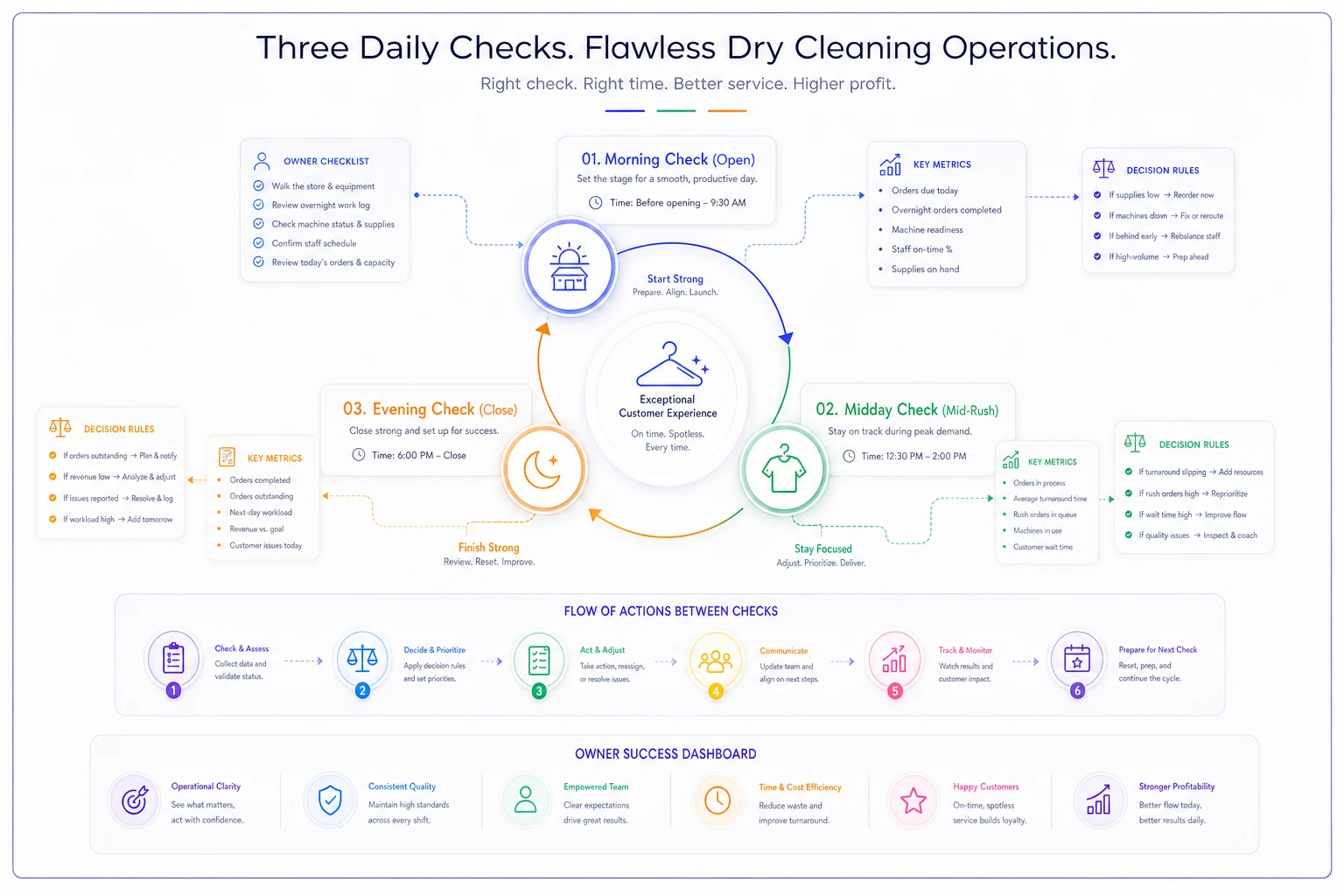
Morning (open — 10 minutes)
This is a forward-looking check. The question is "what does today demand?"
-
Orders promised for today vs. current backlog
-
Rush orders in queue and their cutoffs
-
Staffing vs. expected volume
-
Anything flagged overnight (failed deliveries, machine issues)
The owner here is usually the opening shift lead. The output isn't a report — it's a 2-minute verbal plan. "We've got 14 promised for today, we're already 6 behind from yesterday, so pressing starts on the backlog first."
Midday (mid-rush — 5 minutes)
This is the course-correction check. By midday you know whether the morning plan is holding.
-
Same-day completion pace vs. where it should be
-
Rush orders — any at risk of missing cutoff?
-
Walk-in volume vs. expected
The common failure is shops that only check at open and close. Midday is where you still have time to pull someone off one station to save three promised orders. Miss that window and you're issuing apologies instead of returning garments.
Evening (close — 10 minutes)
This is the accountability and handoff check — looking backward, and setting up tomorrow.
-
Final same-day completion %
-
Rework logged today
-
Orders carried into tomorrow's backlog
-
Delivery failures to resolve
The evening review feeds the next morning's plan. That loop — close reviews backlog, open uses it to prioritize — is what prevents orders from quietly aging into complaints. When turnaround slips, it's almost always because this handoff broke somewhere. Our turnaround time playbook goes deeper on the buffer and escalation side of that.
Decision Rules: Thresholds That Force Action
A number only matters if crossing a line forces something to happen. Vague goals ("we want good turnaround") don't do this. Explicit decision rules do.
A good decision rule has four parts: the metric, the threshold, the trigger, and the action. Here's what that looks like in practice.
Example rules:
-
Same-day completion — if it drops below 90% by midday, the shift lead reassigns one presser to the backlog and notifies the owner. If it drops below 80%, the owner personally reviews the queue and decides what gets pushed to tomorrow (and who gets called).
-
Rework rate — if daily rework exceeds 5% of pieces, the production lead pulls the QC log and identifies the top defect before close. Three days above 5% triggers a station-level review.
-
Delivery failure rate — if a route hits two failed drops, the route owner flags those addresses for a call-ahead the next day. Above 10% on a route, the route gets re-examined for access or timing issues.
-
Rush queue — if more than 4 rush orders are open past noon, the midday check triggers a go/no-go on accepting any more same-day rushes.
Each rule has a soft threshold (adjust within the shift) and a hard threshold (escalate to the owner). Shops that only set one level either escalate too much — the owner gets pulled into everything — or too little, where problems cook until they're expensive.
A Sample Single-Screen Dashboard
You don't need twelve charts. For a single shop, one screen split by cadence works far better. Something like:
TODAY (Tier 1)
-
Promised today
18 | Completed: 11 | Backlog: 7
-
Same-day pace
88% ⚠️
-
Rush open past noon
3
-
Delivery failures (yesterday)
1
THIS WEEK (Tier 2)
-
Rework rate
4.1% ✓
-
Avg turnaround
2.1 days ✓
-
Revenue per labor hour
$41 ⚠️
THIS MONTH (Tier 3)
-
Margin per order
trending down ⚠️
-
Retention (90-day)
61%
The checkmarks and warning flags are the whole point. A manager glancing at this knows in five seconds where to look. The flags map directly to the decision rules above — a ⚠️ isn't decoration, it's a prompt to run the rule.
This is also where connected software earns its keep. When same-day completion, rework, and delivery data all live in separate apps, somebody's manually stitching them together every morning — which means it doesn't happen consistently. An operational platform that pulls these onto one view and flags threshold breaches automatically removes the "I forgot to check" failure point. The goal isn't fancy analytics; it's making the right number impossible to ignore at the moment it matters.
A Real Scenario
A single-location shop doing somewhere around 300–350 orders a week was running almost entirely on gut feel. The owner "knew" turnaround was fine because complaints were manageable. But rework was creeping and nobody tracked it formally.
They set up a basic version of the system above — three daily checks, five Tier 1 metrics, and decision rules tied to thresholds. The first two weeks were mostly just discovering their real baseline. Same-day completion was actually hovering around 84%, not the 90-plus they assumed. Rework was closer to 7% than the "two or three a week" the owner guessed.
Once the midday check and the soft threshold rule kicked in, the shift lead started catching backlog slippage before close instead of after. Over about two months, same-day completion settled into the low 90s and rework dropped to roughly 4%. Nothing dramatic happened on any single day — it was the accumulation of small midday corrections that used to never happen. The owner's words were basically: "I'm not finding out about problems on Thursday anymore."
No new staff. No new equipment. Just ownership, cadence, and rules.
When This Makes Sense (and When It Doesn't)
When it's worth it: You're past the point where one person can see everything. Second shift, a delivery route, a second location, or just enough volume that the owner can't personally touch every order. That's when informal watching fails and structured ownership pays off.
When it's overkill: A small shop doing 60 orders a week with the owner at the counter all day probably doesn't need a three-cadence dashboard. Two metrics checked at close is plenty. Don't build governance for scale you don't have — you'll just create busywork and abandon it.
Who should NOT start here: If your underlying data is unreliable — inconsistent intake, orders not logged properly, no QC log at all — fix data capture first. Governance layered on top of bad data just produces confident wrong decisions. Get clean intake and logging working, then layer ownership and rules on top.
The 30/60/90-Day Adoption Plan
Rolling this out all at once is how it dies. Phase it.
Days 1–30: Baseline and ownership.
-
Pick your Tier 1 metrics (start with 4–5, no more)
-
Write lineage for each — source, definition, refresh, owner
-
Assign one owner per metric
-
Just measure. Don't set thresholds yet — you're learning your real numbers
Days 31–60: Cadence and soft rules.
-
Introduce the morning, midday, and evening checks
-
Set soft thresholds based on your 30-day baseline
-
Add decision rules for in-shift corrections only (no owner escalation yet)
-
Let the team get comfortable acting on flags before raising the stakes
Days 61–90: Escalation and expansion.
-
Add hard thresholds and owner-escalation rules
-
Layer in Tier 2 weekly metrics
-
Review which rules fired too often (threshold too tight) or never fired (too loose) and adjust
-
Start the monthly Tier 3 review tied to margin
The slow pace of month one is intentional. You're just watching, and it feels almost pointless. That patience is what makes months two and three stick. Shops that skip straight to thresholds and escalation on day one almost always set the wrong numbers and lose the team's trust in the first bad week.
Closing Thought
The shops that run tight aren't the ones with the most data. They're the ones where every number that matters has a name next to it and a rule behind it.
That's the whole game with dry cleaner data governance — not better reports, but clearer ownership and decisions that happen before the problem reaches the customer. Start small: five metrics, one owner each, three short daily checks. Let the thresholds reveal themselves over the first month. Everything else builds from there.
The shops that run tight aren't the ones with the most data. They're the ones where every number that matters has a name next to it and a rule behind it.
That's the whole game with dry cleaner data governance — not better reports, but clearer ownership and decisions that happen before the problem reaches the customer. Start small: five metrics, one owner each, three short daily checks. Let the thresholds reveal themselves over the first month. Everything else builds from there.
Ready to elevate your dry cleaning operations?
Join hundreds of dry cleaners using Pressesly to save time, reduce errors, and enhance customer satisfaction.