


Most single‑shop ticket problems don't start at the press or the counter. They start in the 45 seconds when a garment gets tagged and the counter person skips a field because the line is three deep. That missing field — a stain note, a "customer already knows about the tear," a partial‑pickup flag — is what turns into a claim, a redo, or an argument at pickup two weeks later.
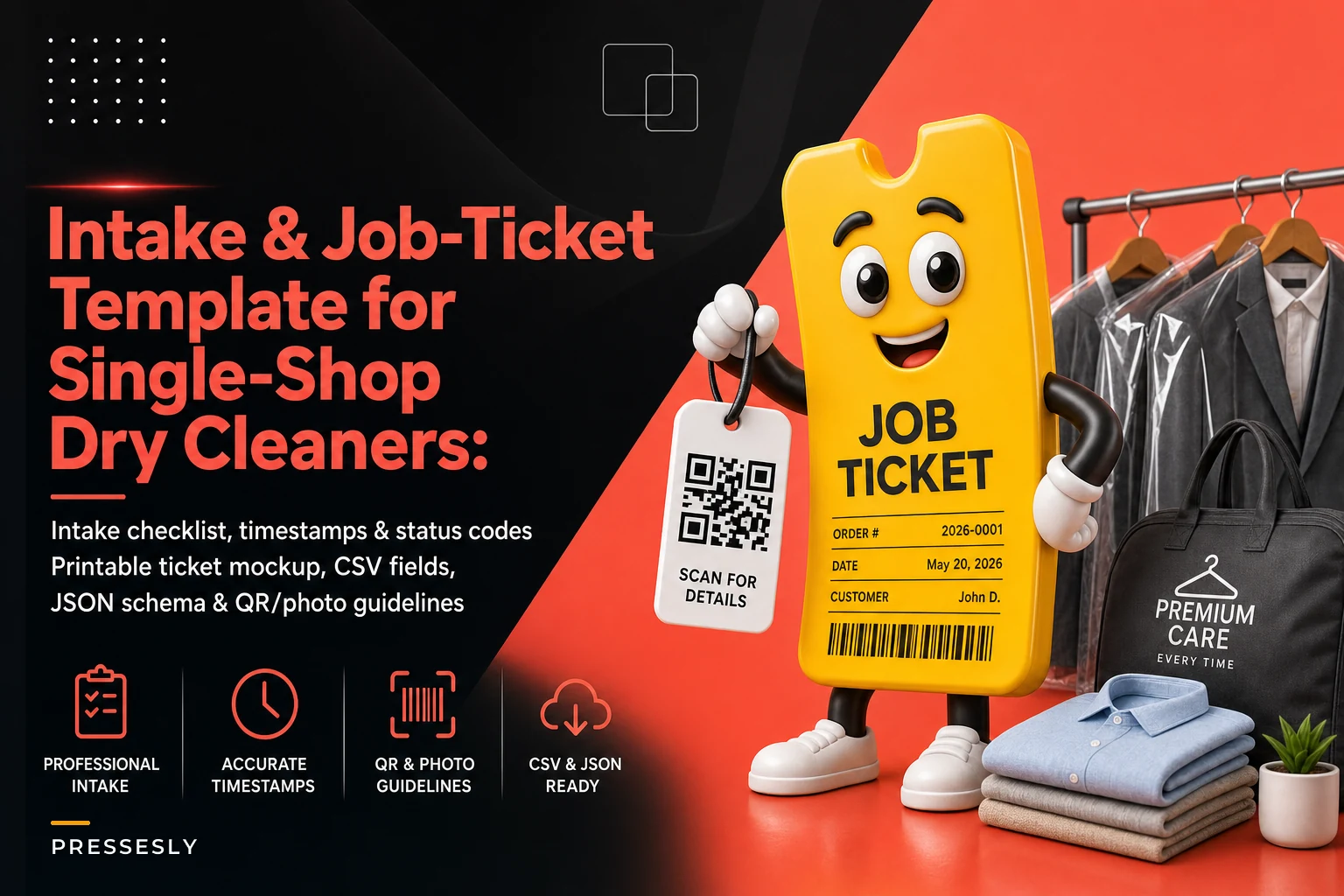
This is a ready‑to‑use dry cleaner job ticket template. Not a philosophy piece. You'll get the exact fields to capture, the timestamp points that actually matter, status codes your whole team can read at a glance, stain severity coding, the QR/barcode tag layout, mobile photo rules, partial‑pickup logging, and the short POS/phone scripts that keep people from cutting corners. At the end there's a printable mockup, a CSV field list, a JSON schema for integrations, and a one‑page staff quick card.
Why generic tickets fail single shops
The pre‑printed carbon tickets most shops still use were designed around one thing: a claim number and a price. Everything else is scribbled in a margin. That works fine when one owner handles intake, cleaning, and pickup. It falls apart the moment a second person touches the order.
The pattern is predictable. Morning counter person notes "wine, back left" in shorthand on the ticket stub, keeps the customer copy clean. Cleaner never sees the note because it lived on the stub. Garment goes through standard cleaning, stain sets, and now it's a customer‑pays‑nothing redo plus a garment you might owe for. The information existed. It just wasn't captured somewhere both people would actually look.
A good ticket isn't about capturing more. It's about capturing the same fields, every time, in the same spots, so anyone downstream can trust what's on the ticket without re‑asking the customer.
The exact intake fields to capture
Below is the field list broken into what's required at intake versus what's optional or system‑generated. Required means the order should not be created without it.
Never lose track of an order again.
Pressesly helps you manage, track, and communicate every garment order seamlessly.
- Unified order management
- Real-time customer notifications
- Staff scheduling & workload tracking
No credit card required
| Field | Type | Required? | Notes |
|---|---|---|---|
| Ticket ID | System | Yes | Auto‑generated, ties to barcode/QR |
| Customer name | Text | Yes | Match to phone for lookup |
| Phone number | Text | Yes | Primary lookup key, not name |
| Intake timestamp | System | Yes | Auto on order create |
| Promised‑ready date | Date | Yes | Drives the whole board |
| Garment count | Number | Yes | Total pieces on ticket |
| Garment line items | Repeating | Yes | Type, color, material per piece |
| Service type | Coded | Yes | DC / LAUN / PRESS / ALT / SPEC |
| Pre‑existing damage flag | Y/N + note | Yes | Tears, missing buttons, wear |
| Stain present | Y/N | Yes | Triggers severity code + photo |
| Stain severity code | Coded | If stain=Y | See coding below |
| Stain location | Text/coded | If stain=Y | Front/back, panel, cuff, etc. |
| Photo taken | Y/N + ref | If damage or stain | Links to image filename |
| Special instructions | Text | No | Starch level, no crease, etc. |
| Customer acknowledged risk | Y/N | If severity ≥ S2 | Verbal, logged |
| Rush flag | Y/N | No | Ties to surcharge + cutoff |
| Deposit taken | Amount | No | For specialty/leather |
| Total pieces at pickup | Number | System | Reconciled against count |
The single biggest miss: shops use name as the primary lookup instead of phone number. Names get spelled three different ways ("Kathy," "Cathy," "K. Ryan"), and duplicate customer records make pickup a mess. Phone is unique, easy to say over the counter, and doubles as your text‑notification field.
Timestamp points that actually earn their keep
You don't need to timestamp everything. You need timestamps at the handoff points where garments get lost or where turnaround disputes happen. Five is enough:
-
Intake time — order created. This is your SLA clock start.
-
Cleaning start — first time the garment hits a process cell. Tells you queue time vs. process time.
-
Cleaning complete / inspected — passed final inspection, ready to bag.
-
Ready‑for‑pickup — bagged, racked, and findable. This is when the customer notification fires.
-
Picked up — order closed, or partially closed.
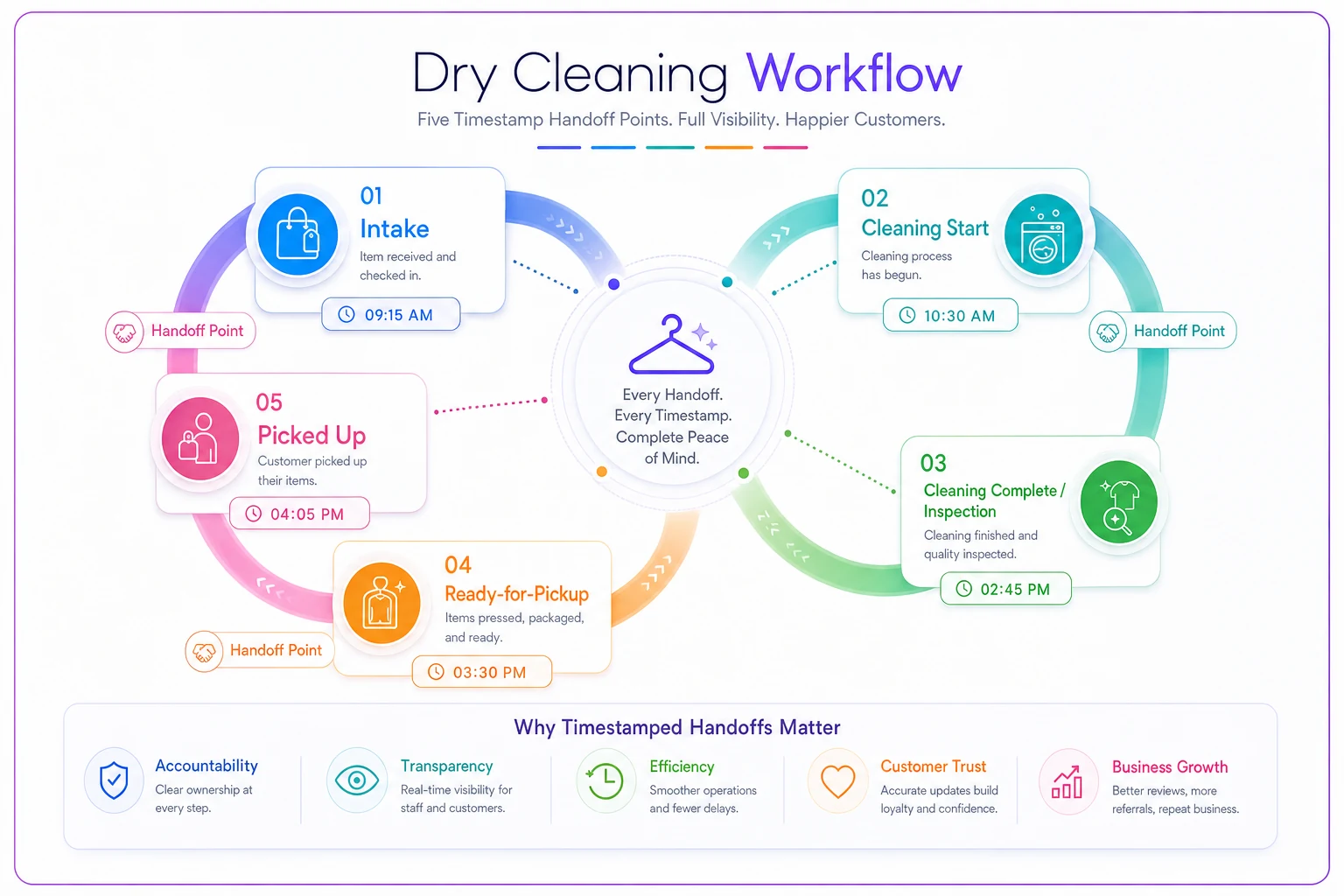
This shows the key handoffs and where to capture timestamps.
The gap between intake and cleaning‑start is where most turnaround problems actually hide. Shops obsess over how long cleaning takes, but a garment that sits 30 hours in the intake queue before anyone touches it is the real delay. If you want the full framework for buffer rules and escalation once you're tracking these, the Shop Turnaround Time Playbook breaks that down in detail.
One practical note: capture these as machine timestamps, not "morning" or "afternoon." When a customer calls asking where their suit is, "cleaning‑complete logged at 2:14 PM Tuesday" ends the conversation. "I think it was done Tuesday" starts an argument.
Status codes your whole team can read
Status codes need to be short enough to write on a rack tag and unambiguous enough that a part‑timer three weeks in can read them without guessing. Keep it to single or double characters.
-
IN — intake, not yet started
-
WIP — in cleaning/processing
-
INSP — awaiting or failed inspection
-
RDY — ready for pickup
-
PARTIAL — some pieces picked up, some remain
-
HOLD — held for customer decision (stain risk, damage, payment)
-
RDO — redo / rework in progress
-
CLOSED — fully picked up and paid
The mistake is inventing too many codes. Shops with 14 status codes end up with half of them meaning nothing to anyone on shift. If a status doesn't change what someone does next, it doesn't need to exist. HOLD and RDO are the two most under‑used and most valuable — they stop a garment from silently moving forward when it actually needs a human decision.
Stain severity coding
A stain note that just says "stain" is useless. The cleaner needs to know how aggressive to get and whether the customer was already warned. Four levels covers it:
| Code | Meaning | Action |
|---|---|---|
| S1 | Light / fresh, likely removable | Standard treatment |
| S2 | Moderate, set or oily | Pre‑treat, flag for inspection |
| S3 | Heavy / old / unknown origin | Attempt, customer risk acknowledged |
| S4 | High‑risk (dye, ink, bleach, heat‑set) | HOLD, get customer sign‑off first |
The rule that saves you money: anything S2 or above triggers a photo, and anything S3 or above requires a logged customer acknowledgment before cleaning. That acknowledgment — even just "customer aware, may not come out, logged 9:20 AM" — is what protects you when the shirt comes back still stained and the customer wants a refund. This ties directly into a proper stain‑assessment decision tree if you want the deeper escalation logic behind these thresholds.
QR/barcode tag layout and what data goes on it
Keep the barcode simple. The tag itself should encode only the Ticket ID — a short unique string. Everything else lives in your system, keyed to that ID. Encoding customer names or stain data into the barcode is a mistake; it makes the tag long, fragile, and impossible to update if something changes mid-order.
-
QR or Code‑128 barcode (Ticket ID only)
-
Ticket ID in human‑readable text (in case the scanner fails)
-
Customer last name + last 4 of phone (fast visual match on the rack)
-
Promised‑ready date (big, so it's readable across the room)
-
Piece X of Y (so a split order doesn't look complete when it isn't)
-
Status code (handwritten or reprinted, IN/WIP/RDY)
The "Piece X of Y" line is the one shops skip and regret. When one garment from a five‑piece order gets pulled out for a specialty clean, that piece needs to say "4 of 5" so nobody bags the other four and calls the order done.
Mobile photo guidelines
Photos only help if they're consistent enough to actually reference later. Loose rules produce a camera roll of blurry, context‑free shots nobody can tie to a specific ticket.
-
Shoot in the same lighting spot every time — a fixed intake counter position, not wherever the customer happens to be standing.
-
First frame
the tag or Ticket ID
, then the garment. This ties every photo to an order automatically. -
Fill the frame with the damage or stain — don't photograph the whole garment for a cuff stain.
-
Take one wide (whole garment) and one close (the issue) for anything S3 or above.
-
Name/link the file to the Ticket ID, not a random timestamp string.
-
Photos happen at intake, before cleaning — not after, when you're trying to prove something.
When in doubt, retake the close-up with the Ticket ID visible — insurers look for context.
For claims that need to hold up with insurers, the angle and filename discipline matters even more, and there's a full intake‑to‑claims photo protocol worth following for high‑value pieces.
Partial‑pickup logging rules
Partial pickups are where reconciliation quietly breaks. Customer picks up three of five shirts, counter person hands them over, and either marks the whole order CLOSED (now two shirts are "lost") or leaves it RDY (now the system thinks five are still waiting).
-
Never close an order that still has pieces on the rack. Use PARTIAL.
-
Log which specific line items were picked up, not just a count.
-
Update the piece count on the tag
"2 of 5 remaining."
-
Re‑fire the ready notification for the remaining pieces if they'll sit more than a day.
-
Only mark CLOSED when the last piece leaves and payment is settled.
A partial pickup should always leave a paper and digital trail of what left and what stayed. "Picked up 3, 2 remain" without line detail means you can't tell which two are still yours when the customer comes back asking.
The minimal scripts that enforce all of this
None of the above works if the counter person can skip fields under pressure. Two short scripts close that gap.
Intake (POS) script: > "Can I get the phone number on the account? … Okay, [name]. What are we cleaning today? … I see a stain here on the [location] — has this been treated or washed already? … Just so you know, older stains like this we'll do our best but can't guarantee. I'm noting that. Ready date is [date]. Any of these need a rush?" That script naturally forces: phone lookup, garment count, stain check, severity acknowledgment, promised date, and rush flag — the required fields, in order, without the customer feeling interrogated.
Pickup / partial script: > "Let me pull that up by phone number. You've got five pieces — are you taking all of them today? … Okay, three today. I'm marking two as still with us so nothing gets lost. Here's your updated slip." The phrase "so nothing gets lost" does real work — customers accept the partial logging because it's framed as protecting their garments.
When a rigid ticket system is overkill
If you're a genuine one‑person operation — you do intake, cleaning, and pickup yourself, low volume, no employees — some of this is heavier than you need. You can drop cleaning‑start timestamps and lean on IN/RDY/CLOSED alone. The moment you add a second person or a delivery route, though, the full field list stops being optional. Every field on that list maps to a specific way orders get lost when two people share the work.
Where a POS or workflow platform earns its place is enforcement and reconciliation — required fields that block order creation when a stain flag is missing, auto‑timestamps at each scan, photos auto‑linked to the ticket, and a daily "pieces in vs. pieces out" count. You can run this entire template on paper. Software just makes the skipped‑field problem impossible instead of merely discouraged.
Real scenario: a two‑counter suburban shop
A single‑location shop running roughly 260–300 orders a week had a recurring problem: around 6–8 "where's my garment" disputes a month, and two or three redos monthly traced back to unrecorded stain warnings. Intake was handled by whoever was free, and stain notes lived on scrap paper.
They rolled out the field list and severity codes above, made phone number the lookup key, and added the "Piece X of Y" line and PARTIAL status. Nothing fancy — reprinted tags and a laminated quick card at each counter.
Within about two months, the lost‑garment disputes dropped to one or two a month, and the stain‑related redos mostly disappeared because S3+ garments were now sitting on HOLD with a logged acknowledgment before anyone cleaned them. The owner's rough estimate was a few hundred dollars a month in avoided redos and comped orders — plus a lot less counter arguing, which doesn't show up on a P&L but absolutely matters.
Deliverables
Printable ticket mockup (text layout)
------------------------------------------------ [SHOP NAME] TICKET: DC-10482 Barcode: |||| |||| |||| |||| (Ticket ID) ------------------------------------------------ Customer: RYAN, K. Phone: ...-4471 Intake: 06/12 9:14 AM Ready: 06/14 ------------------------------------------------ PIECE 1 of 4 Type: Suit jacket Color: Navy Mat: Wool Service: DC Stain: Y S3 (back-left panel) Pre-damage: Y - loose button, right cuff Photo: DC-10482-p1.jpg Cust. acknowledged risk: YES (9:16 AM) ------------------------------------------------ Status: [ IN ] [ WIP ] [ INSP ] [ RDY ] [ HOLD ] Notes: no crease on trousers ------------------------------------------------
Downloadable CSV field list
fieldname,type,required,notes ticketid,string,yes,system-generated customername,string,yes,last-first phone,string,yes,primary lookup key intakets,datetime,yes,auto promisedready,date,yes,drives board piececount,integer,yes,total pieces lineitemtype,string,yes,per piece lineitemcolor,string,no,per piece lineitemmaterial,string,no,per piece servicetype,enum,yes,DC/LAUN/PRESS/ALT/SPEC predamageflag,boolean,yes,tears/buttons/wear predamagenote,string,no, stainflag,boolean,yes, stainseverity,enum,conditional,S1/S2/S3/S4 stainlocation,string,conditional, photoref,string,conditional,filename custackrisk,boolean,conditional,required if S3+ rushflag,boolean,no, depositamount,decimal,no, statuscode,enum,yes,IN/WIP/INSP/RDY/PARTIAL/HOLD/RDO/CLOSED cleaningstartts,datetime,no,auto on first scan cleaningcompletets,datetime,no, readyts,datetime,no,fires notification pickupts,datetime,no, pieces_remaining,integer,conditional,for partials
Sample JSON ticket schema
{ "ticketid": "DC-10482", "customer": { "name": "Ryan, K.", "phone": "5550004471" }, "timestamps": { "intake": "2025-06-12T09:14:00", "cleaningstart": null, "cleaningcomplete": null, "ready": null, "pickup": null }, "promisedready": "2025-06-14", "piececount": 4, "piecesremaining": 4, "statuscode": "IN", "rushflag": false, "lineitems": [ { "piece": 1, "type": "suit jacket", "color": "navy", "material": "wool", "servicetype": "DC", "predamage": { "flag": true, "note": "loose button right cuff" }, "stain": { "flag": true, "severity": "S3", "location": "back-left panel", "photoref": "DC-10482-p1.jpg", "custackrisk": true }, "specialinstructions": null } ] }
One‑page staff quick card
AT INTAKE — always capture:
-
Phone number FIRST (it's the lookup key)
-
Piece count → confirm out loud
-
Stain? Y/N → if Y, code it S1–S4
-
S3 or S4 → take a photo + say the risk line + log "customer aware"
-
Pre‑existing damage → note it, don't skip it
-
Promised‑ready date → write it big
-
Rush? flag it
PHOTOS:
-
Tag/Ticket ID in first frame
-
One wide + one close for S3+
-
Shoot at intake, before cleaning
STATUS CODES: IN → WIP → INSP → RDY → CLOSED Use HOLD for customer decisions. Use PARTIAL when only some pieces leave.
PARTIAL PICKUP:
-
Never CLOSE with pieces still on the rack
-
Log which items left
-
Update tag
"X of Y remaining"
-
Say
"marking the rest as still with us so nothing gets lost"
Say: "marking the rest as still with us so nothing gets lost"
The value here isn't the ticket design itself — it's that every field maps to a specific failure you've probably already paid for: the lost partial pickup, the stain redo, the "I never spelled my name that way" duplicate record, the turnaround dispute with no timestamp to point to. Standardize the intake and most of those failures stop happening on their own. Start with the CSV field list and the quick card, run it on paper for a couple of weeks, and only reach for software once you know the process works and you just want it enforced automatically.
Ready to elevate your dry cleaning operations?
Join hundreds of dry cleaners using Pressesly to save time, reduce errors, and enhance customer satisfaction.